Chapter 09
Phone access (dial release)
Phone access lets someone open a door by ringing a phone number: no fob, no app. One inbound number serves every site and tenant on the panel. There are two ways a call can open a door:
- Caller-ID release for known people. The caller's number is recognised; if they may open exactly one door it opens straight away and the call ends; if several, a short keypad menu asks which.
- Apartment mode for guests and anyone whose number is not recognised. The caller keys in an apartment number and then a PIN; the doors ticked for that apartment's resident open. This suits holiday lets, Airbnb, tradespeople and deliveries: give the guest a PIN, change it after they leave.
The same phone line does one more job. A known caller can enrol a new fob over the phone: press # at the start of the call, key in the site's number, and they have ten minutes to walk to a door and present the new fob, which is then attached to them. That is described under "Phone enrolment" below.
A confirmed room booking also opens a door by phone for the length of the slot, even for someone with no phone-release doors ticked at all (chapter 8).
Every call, allowed or refused, is written to the Log with the number and the outcome (chapter 11).
The phone side runs on a PBX (phone system). MiRTA PBX and other Asterisk-based systems are supported out of the box with the script supplied; anything that can make an HTTPS request can use the same small API.
Setting it up per person
On the person's page, in the Door release by phone panel:
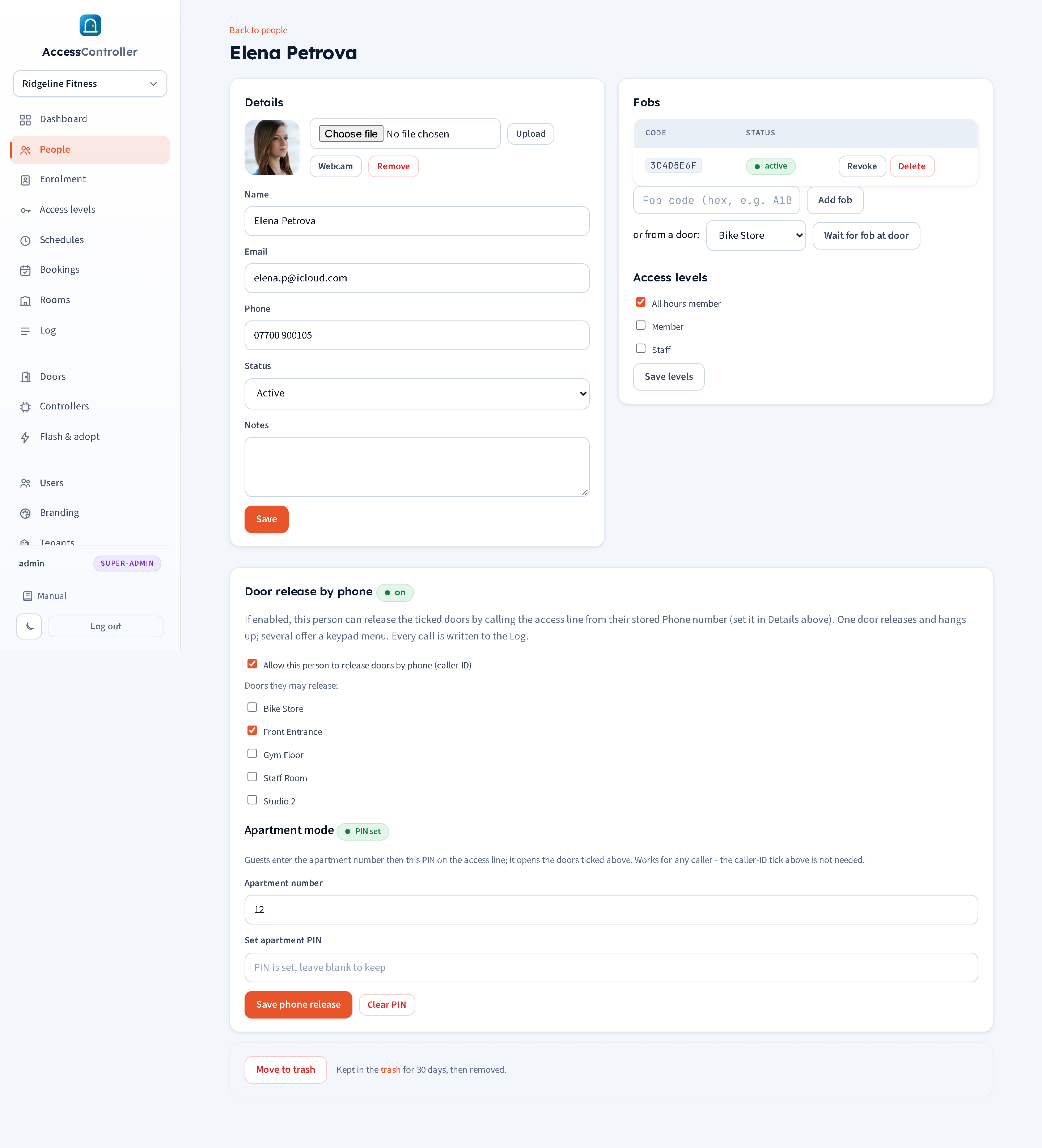
- Make sure the person's Phone is filled in under Details. Caller IDs are matched on the last nine digits, so the format does not matter.
- Tick Allow this person to release doors by phone (caller ID).
- Tick the doors they may release. One door means instant release; two or more means the keypad menu.
- Press Save phone release.
The panel heading shows an on or off badge so you can see at a glance whether the person has phone release.
For apartment mode on the same panel:
- Enter the Apartment number (digits only, up to 10). This is what the guest keys in first.
- Enter a PIN of 4 to 10 digits in Set apartment PIN. The PIN is stored hashed; the panel never displays it again, so write it down for the guest before leaving the page. The badge shows PIN set or no PIN.
- Tick the doors under "Doors they may release" (the same door list is used for both paths). The caller-ID tick is not needed for apartment mode.
- Press Save phone release.
To change a guest's PIN, type a new one and save. Clear PIN removes it (after confirmation) so the apartment number no longer opens anything. If several people share an apartment number, each has their own PIN and any of them works.
An inactive person cannot release doors by caller ID.
Menu numbering
When a caller may open more than one door the PBX plays a prompt, then speaks the option numbers ("one", "two", ...). Door names themselves are not spoken (the PBX has no text-to-speech). Options are numbered in alphabetical order of door name, which is the order the doors appear on the person's page, so tell people "1 is Front Entrance, 2 is Gym Floor".
Phone enrolment
Handing a new fob to somebody usually means a trip to the office. Phone enrolment removes it: the member rings the access line from their own mobile, keys in the building's number, walks to a door and presents the new fob. It is attached to them, with the site's enrolment access level, without anyone touching the panel.
The site number
Because one inbound number serves every building on the panel, the caller has to say which building they are at. That is what the site number is for.
Set it on Settings under Site number (phone enrolment): 2 to 6 digits, and it must be different from every other site's on the panel (the panel refuses a number already in use and tells you so). Leave it empty and phone enrolment is switched off for that site. Press Save site number.
Pick something the residents will not have to look up: the building number, the last digits of the postcode, anything printed by the door.
What the caller does
- Ring the access line from the mobile number recorded on their person page.
- The line answers and, because it recognises them, offers "To enrol a new fob, press hash" and waits about three seconds.
- They press
#. (Doing nothing instead lets the call carry on and open the door as normal, so the offer costs a regular caller a three-second pause and nothing else.) - The line asks for the site number. They key it in. The door is not released on this call.
- They walk to a door and present the new fob. The next unknown fob presented at any of the site's enrolment doors, within ten minutes, is attached to them.
The Log records Phone enrolment armed when the window opens, and Fob enrolled at door with "by phone" in the detail when the fob lands.
What has to be set up first
Phone enrolment arms a window only if the site has enrolment doors picked on the Enrolment page (chapter 6). Those ticks are what decides where a caller may present a fob.
- If enrolment mode is already running, the caller gets their ten minutes at the doors it is running at.
- If enrolment mode is off but doors are still ticked from the last time, the
#path switches it on for those doors for ten minutes. It never changes the doors or the access level an administrator chose, and it never shortens or extends a window that is already running longer. - If no doors are ticked at all, the caller hears the refusal prompt and nothing happens.
The access level the fob arrives with is the default access level set in the Enrolment mode panel, and it is added to whatever the person already holds, so a member who is enrolling a replacement fob keeps everything they had.
Safety of it
Phone enrolment is deliberately narrow:
- It only ever attaches a fob to the person whose number rang in. It cannot create people and cannot enrol anyone else.
- It never opens a door. The call that enrols is not the call that lets you in.
- It only works at doors an administrator has already put into enrolment mode, and only for ten minutes.
- The site number stops a caller enrolling themselves at somebody else's building. It is not a password, and it should not be treated as one: the protection comes from the caller ID and from the enrolment doors, not from the digits.
Because caller ID can be spoofed (see "Security notes" below), treat phone enrolment the way you would treat caller-ID release: fine for a gym or an apartment block, not for a door where a fob is a security control in its own right. Leaving the site number empty switches it off entirely.
The shared API token (Settings)
The PBX authenticates to the panel with one shared token. It is on Settings under Phone unlock (dial release) API, visible to super admins only:
- The endpoint URL (ending
/api/phone/doors; the base of it is what the PBX script needs). Copy URL copies it. - The token. Copy token copies it.
- Regenerate issues a new token and invalidates the old one immediately; the PBX script must then be updated. Do this if the token may have leaked.
One token serves all tenants: it identifies your PBX, not a customer.
Setting up MiRTA PBX (Asterisk AGI)
MiRTA PBX is Asterisk-based and runs custom call logic as AGI scripts attached to a Custom Destination. The supplied script door_release.php (in the product's docs/pbx folder) does the whole call: answers, prompts, collects digits, calls the panel, plays the result and hangs up. It is written for the PHP 5.x found on MiRTA boxes.
- Upload
door_release.phpwith WinSCP (or scp) into the PBX's AGI folder, the same one your existing AGI scripts live in, normally/var/lib/asterisk/agi-bin/. Make it executable (chmod 755 door_release.php, or permissions 0755 in WinSCP). It must keep Unix line endings. - Edit the two lines near the top of the script:
$TOKEN= the token from Settings;$BASE= your panel's public URL, for examplehttps://doors.example.com, with no trailing slash. Always use thehttpsaddress. - In the PBX tenant, Custom Destinations > add: type AGI script, choose
door_release.php. Leave the parameters empty (set "Number of Parameters" to 0); the script reads the caller's number from the AGI environment. - DIDs: open the inbound number you want to use for door release and set its destination to that Custom Destination. Save.
- Test: ring the number from a phone whose number is set on a person with a door ticked. It should answer, play the granted prompt (or "thank you") and open the door. Then ring from an unknown phone: it should ask for an apartment number and PIN.
The script also sets the channel variable AGIRESULT to TRUE or FALSE, so you can optionally follow it with a MiRTA Condition (for example, route failures to reception). Not required.
For debugging, the script writes to /tmp/door_release.log on the PBX and to the Asterisk console (asterisk -rvvv, lines starting [door_release]). PHP with curl is normal on a MiRTA box; if curl is missing the script falls back to PHP streams.
Recorded prompts
The script plays custom recordings if present and falls back to built-in Asterisk sounds otherwise. Record 8 kHz, mono, 16-bit PCM WAV files (or GSM) and put them in /var/lib/asterisk/sounds/door_release/:
| File | Suggested wording | When it plays |
|---|---|---|
granted.wav | "Access granted. The door is now open." | A door was released. |
choose.wav | "Press the number for the door you want to open." | Before the option numbers are spoken. |
denied.wav | "Sorry, that is not recognised. Please contact the office." | Refused, locked out, rate limited, panel unreachable or bad token. |
enrol_offer.wav | "To enrol a new fob, press hash." | A known caller, before the door is released. |
enter_site.wav | "Enter your site number, then hash." | After the caller has pressed #. |
enrol_armed.wav | "Go to the door and present the new fob within ten minutes." | The enrolment window has been armed. |
enter_apartment.wav | "Please enter your apartment number, then hash." | Start of the guest path. |
enter_pin.wav | "Now enter your PIN, then hash." | Guest path. |
wrong.wav | "That apartment number or PIN was not recognised. Please try again." | Guest path retry (up to three attempts). |
goodbye.wav | "Goodbye." | Timeouts and after the last failed attempt. |
Keep enrol_offer.wav short. It plays to every recognised caller before their door opens, and the script waits about three seconds afterwards for a keypress, so a long recording makes every ordinary call feel slow. The prompt can be interrupted: a caller who knows the routine can press # while it is still playing.
If a site does not use phone enrolment, record enrol_offer.wav as a moment of silence, or leave the site number empty (the panel then never arms a window) and accept the short pause.
Other PBXs: the API
Any phone system that can make an HTTPS POST can drive door release. All calls are POST with a JSON body (form encoding is also accepted) and the header Authorization: Bearer <token>.
| Endpoint | Body | Result |
|---|---|---|
/api/phone/doors | {"caller":"+447911123456"} | {"result":"granted","door":"..."} (door opened); {"result":"choose","doors":[{"opt":1,"name":"..."},...]}; HTTP 403 with code unknown_caller or no_doors; 401 bad token; 429 rate_limited; 503 no_controller. |
/api/phone/doors | {"caller":"...","dry":true} | Identify only, release nothing. {"result":"known","name":"...","doors":[{"opt":1,"name":"..."},...]}, or 403 unknown_caller. Call this first if you want to offer enrolment before the lock clicks. |
/api/phone/release | {"caller":"...","opt":2} | granted, or 403 (unknown_caller, bad_option). |
/api/phone/apartment | {"apartment":"12","pin":"4913","caller":"...","opt":N} (opt optional) | granted, choose (then repeat with opt), 403 bad_pin or no_doors, 429 locked_out with retry_after seconds. |
/api/phone/enrol | {"caller":"...","site":"4021"} | {"result":"armed","minutes":10,"doors":["Front","Gym"]}; 403 unknown_caller, bad_site (no site has that number) or wrong_site (the number belongs to a different site from the caller's); 409 no_enrol_doors; 429 rate_limited. |
Suggested call flow: answer; call /doors with "dry":true to identify the caller; if the result is known, play the enrolment offer and wait about three seconds for a #; if # was pressed, collect the site number and call /enrol, play the armed prompt and hang up without opening anything; otherwise call /doors for real, and on granted play the granted prompt, on choose play the menu, collect a digit and call /release; on any 403 fall into the apartment path: collect apartment and PIN, call /apartment (again handling choose), allow three attempts.
Note: collect the enrolment keypress with a "wait for one digit" primitive, not with a digit-collection primitive. Most systems, Asterisk included, treat
#as the terminator of a digit string, so a#pressed on its own is reported as "nothing was pressed" and the offer appears to be ignored.
Security notes
- Caller ID can be spoofed. Some telephony providers let the caller present any number. Caller-ID release is therefore convenience-grade: right for a gym member or an employee, not for a high-security door. Where a real secret matters, use apartment mode (a PIN) or a fob. Both paths are logged.
- Apartment PINs are stored as bcrypt hashes and never shown. After five consecutive wrong PINs for an apartment the panel locks that apartment for 60 seconds, doubling with each further failure up to 16 minutes; a correct PIN during a lockout is still refused. Unknown apartment numbers take the same time to answer as wrong PINs so a caller cannot tell them apart.
- Phone enrolment attaches a fob only to the person whose number rang in, only at doors already in enrolment mode, only for ten minutes, and it never opens a door. The site number keeps a caller out of another building's enrolment window; it is not a secret and is not a substitute for the caller ID check. Leave the site number empty to switch phone enrolment off for a site.
- Rate limiting: the phone API allows a burst of 10 requests and then about 2 per second per source IP address. A PBX making normal calls never hits this.
- The token authenticates the whole PBX. Keep it out of tickets and email; if it leaks, Regenerate it on Settings and update
$TOKEN. - Always point the PBX at the
httpsaddress so the token and numbers are not sent in clear. - A release by phone always sends the unlock to the door's active controller; if the door has no active controller the call is refused and logged (
no_controller).