Chapter 11
Log and reporting
Everything the system does is written to the Log: every scan at every door, every phone release, every opening and closing of a door that has a contact, every exit-button press, every alert from a door, and every administrative event that affects access. Each tenant sees only its own log.
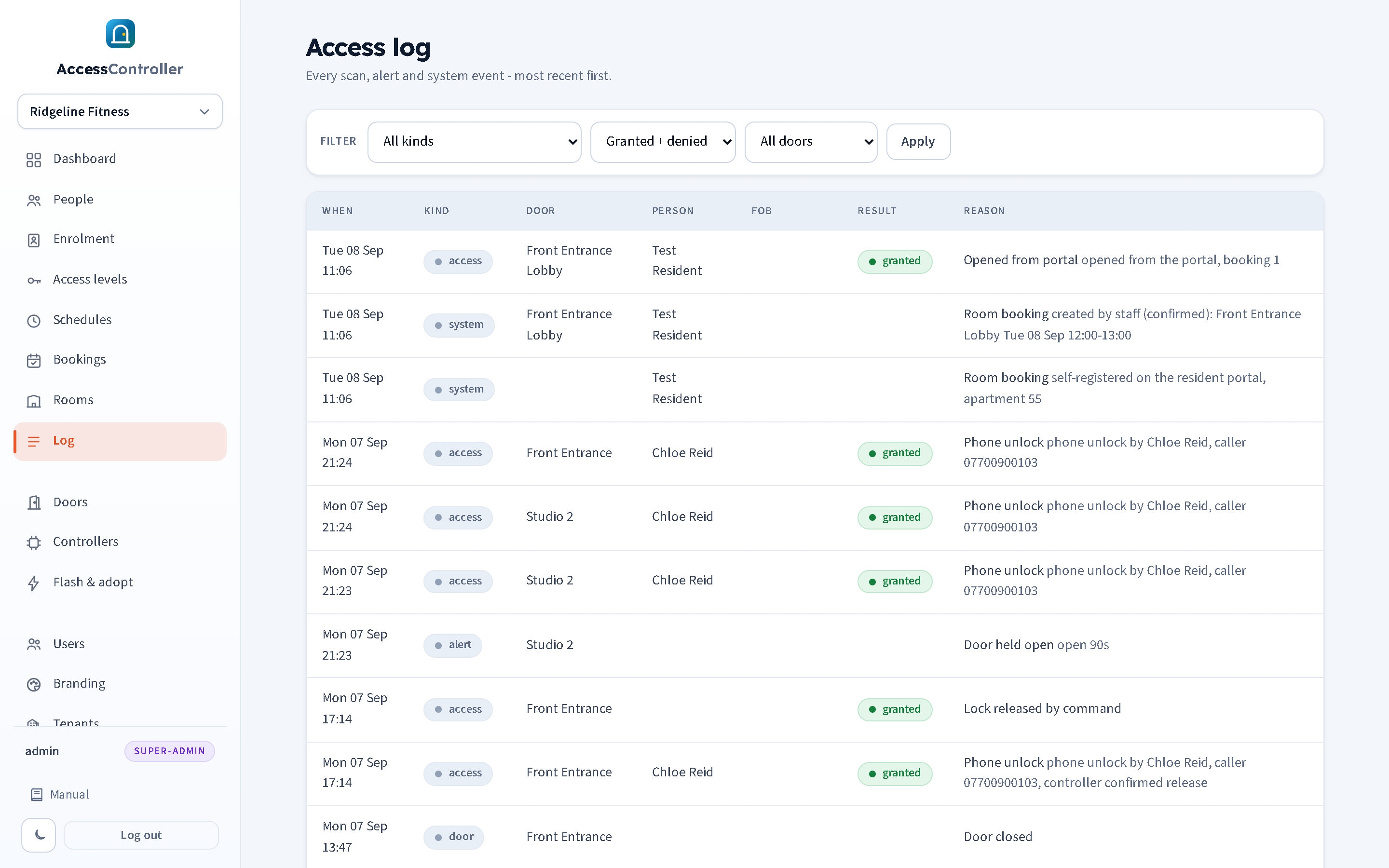
Reading the log
Open Log in the sidebar. The newest events are at the top; the page shows the most recent 200 matching the filter. Each row has:
| Column | Meaning |
|---|---|
| When | Date and time in the panel's timezone. For scans this is the controller's own timestamp at the moment of the scan (so events that were queued while offline still show the right time); if the controller had no valid clock the arrival time is used. Rows imported from an AC8000 backup keep the original date and time from the old system. |
| Kind | access, door, alert or system (see below). |
| Door | The door name, or the controller ID if the controller is not mapped to a door. |
| Person | The person the fob belonged to at the time, if known. Blank for unknown fobs and for exit-button and remote unlocks. |
| Fob | The fob code, in hexadecimal. |
| Result | granted or denied for access events; blank for door events, alerts and system events. |
| Reason | The reason in plain English, followed by any detail (for example the caller's number for a phone unlock, or how long a door was held). |
The dashboard shows the last 15 events in the same format, plus today's counts.
Filters
The toolbar at the top filters the list; press Apply.
- Kind: All kinds, Access, Door open/close, exit button, Alerts or System.
- Result: Granted + denied, Granted only, Denied only. (Only meaningful for access events.)
- Door: All doors or one door.
The dashboard's red "Denied today" tile links straight to the log filtered to denied events. Filtering by person is done from the person's fobs: search the log page in your browser for the fob code, or use the People search to confirm whose fob a code is.
Event kinds
- Access: an attempt to open a door, whether by fob, remote unlock or phone. Always granted or denied with a reason. These are the events the dashboard's scan and denied counts and the reception screen are built from.
- Door: the door contact changing state (door opened, door closed) and exit-button presses. Neutral: no result, not counted as a scan or a denial, not shown on the reception screen. Only produced by controllers with a door sensor or exit button wired and the current firmware.
- Alert: something the door reported on its own: forced open, held open, or a failed update. Forced and held-open alerts can also be sent to Telegram (chapter 4).
- System: administrative events: a controller registered, enrolment started or stopped, a phone enrolment window armed, a fob captured or enrolled, an import from CSV or an AC8000 backup, a person moved to or restored from the trash, and every change to a room booking.
Imported history
When a site is migrated from an AC8000 / iCCard3000 system with the import wizard (chapter 6), the old system's swipe records can be brought into the Log. They appear as ordinary access events, granted or denied, and are told apart from the panel's own events by their detail, which reads AC8000 history, reader (reader name), for example AC8000 history, reader HiveDoor-In. The reader name is the one the old system used for that side of the door; the Door column shows the door the wizard derived from it (or created).
Imported rows carry the original timestamps from the backup, so they sort into the Log at the dates and times the swipes really happened, not at the time of the import; filter by door or result and they behave like any other event. Where the card belongs to a person on the panel the Person column shows their name; a swipe by a card that was not in the backup's people list shows no person, and if the old system had refused it the row is denied with the reason Unknown fob. The import itself is recorded once as a system event with the counts.
Every reason code
The panel shows reasons in words. This table gives the code the controller and the API use, the words shown, and what to do about it.
Access decisions
| Code | Shown as | Meaning and what to do |
|---|---|---|
ok | OK | Granted: the fob is active, the person is active, one of their levels includes this door and the time is inside its schedule. |
unknown_fob | Unknown fob | Denied: the code is not on any person in this tenant. A new member's fob has not been added, a visitor tried their fob from elsewhere, or the reader sent a different format. Use the desk scan or Enrolment to attach it, or Check access to test it. |
fob_revoked | Fob revoked | Denied: the fob is on a person but its status is revoked. Re-activate it on the person's page if that was a mistake. |
member_inactive | Person inactive | Denied: the person's status is inactive. Everything else is fine; set them active to restore access. |
no_access_level | No access level for door | Denied: the person is active but none of their access levels includes this door (or they hold no levels). Add the right level. |
outside_schedule | Outside schedule | Denied: a level includes the door but the current day and time are outside that level's schedule. Check the schedule, and check that the panel timezone is right if it seems off by an hour. |
enrol | Enrolment (auto-accepted) | Granted: enrolment mode was on and an unknown fob was let in and captured. Assign it on the Enrolment page. |
remote_unlock | Remote unlock (panel) | Granted: someone pressed Unlock on the Controllers page. No person is recorded. When the controller confirms it carried the unlock out, that confirmation is folded into this same row rather than logged twice. |
cmd_unlock | Lock released by command | Granted: a controller reported that it released the lock on command, but the panel had no matching row to fold it into. In practice this means a release the panel did not initiate, or one whose originating row was more than about twenty seconds old. |
phone_unlock | Phone unlock | Granted (or denied) via the phone line. The detail says who and from which number, or why it was refused: unknown caller, no release doors, wrong PIN, locked out, no active controller. |
portal_unlock | Opened from portal | Granted: a resident pressed Open the door on the booking portal during a confirmed slot (chapter 8). The detail gives the booking number. If no controller was online the row is denied instead. |
Door events
| Code | Shown as | Meaning |
|---|---|---|
door_opened | Door opened | The door position sensor saw the door open. Stamped with the controller's time. If there was no grant or exit press just before, a Door forced alert follows. |
door_closed | Door closed | The door position sensor saw the door close again. The gap between this and the preceding Door opened is how long the door stood open. |
rex | Exit button pressed | The exit button on the inside was pressed and the door released. Free egress; no person is recorded. |
Contact changes within 200 ms of the previous one are ignored by the controller, so a rattling reed switch does not fill the log.
Alerts from the door
| Code | Shown as | Meaning and what to do |
|---|---|---|
door_forced | Door forced | The door-position sensor saw the door open with no grant, exit press or remote unlock in the last few seconds. Someone forced it, propped it, or the exit button is bypassed. Also raised if the sensor is faulty or wired the wrong way round. Sent to Telegram if enabled (chapter 4). |
door_held_open | Door held open | The door stayed open longer than the door's Alert if held open time (60 seconds by default, set per door in chapter 3; 0 = off). Someone is holding it, it is wedged, or the closer is weak. The detail says how long. Sent to Telegram if enabled (chapter 4). |
ota_failed | ota_failed | An over-the-air update failed; the detail has the reason. The controller keeps running its old firmware. |
tamper, power | tamper, power | Reserved in the protocol for enclosure tamper and power alerts; not raised by the current firmware. |
System events
| Code | Shown as | Meaning |
|---|---|---|
registered | Controller registered | A controller announced itself for the first time; its firmware and IP are in the detail. Onboard it on the Controllers page. |
captured | Captured for enrolment | A door was listening (chapter 6) and an unknown fob was captured there. It is on the Enrolment page. Not a denial. |
fob_enrolled | Fob enrolled at door | A fob captured at a listening door was attached straight to a person. |
enrol_started | Enrolment started | Enrolment mode was switched on; the detail gives the duration. |
enrol_stopped | Enrolment stopped | Enrolment mode ended (manually or by timer). |
enrol_armed | Phone enrolment armed | A recognised caller pressed # and keyed in the site number, opening a ten-minute window to present a new fob (chapter 9). The detail names the person, the doors and the calling number. |
trashed | Moved to trash | A person was moved to the trash, singly or in a bulk action (chapter 6). |
trash_restored | Restored from trash | A person was restored from the trash. |
trash_deleted | Deleted permanently | A person in the trash was deleted for good. |
trash_purged | Trash purged | The automatic 30-day sweep removed people from the trash. The detail gives the count. |
booking | Room booking | A room booking was created, confirmed, cancelled or expired, or somebody self-registered on the resident portal (chapter 8). The detail says which, with the room and slot. |
import | CSV import | An import ran (from a CSV or from an AC8000 backup; the label says CSV either way); the detail gives the counts created, attached, skipped and failed, and the number of history records added. |
ota_start | ota_start | A controller began downloading a firmware update. |
setcfg | setcfg | A controller received a re-point command and is restarting on its new server. |
Using the log
- Who was in the building? Filter Kind = Access, Result = Granted, pick the door. Names and times are in order.
- Why was someone refused? Filter Result = Denied. The reason column tells you exactly which rule failed; the person's page is a click away via People search.
- Is a door being propped? Filter Kind = Alerts. Repeated Door held open on one door points to a closer or a habit. Switch to Kind = Door open/close, exit button and pick the door to see each Door opened / Door closed pair and how long the door actually stood open.
- Who let someone out? Filter Kind = Door open/close, exit button. Exit button pressed lines show every release from the inside, with the door and time.
- Who used a booked room? Filter Kind = System and read the Room booking lines for the booking's history, then Kind = Access on that door for Opened from portal, Phone unlock and fob entries during the slot (chapter 8).
- Audit an administrator's actions: System events record enrolment windows, imports, controller registrations, deletions to the trash and restorations, with times. Panel logins and edits to a person's details are not written to this log in the current release (see chapter 15).
Events are kept indefinitely; the database grows by a few hundred bytes per event. The host can archive or trim old events at the database level (chapter 16).