Chapter 13
Settings reference
- Enrolment mode
- Controller Wi-Fi
- Controller type
- Channel 1 wiring (pin map)
- Channel 2 wiring - dual-door only
- Panel & infrastructure (shared, super admin only)
- Bookings and portal
- Site number (phone enrolment)
- Alerts (Telegram)
- Phone unlock (dial release) API (shared, super admin only)
- Controller MQTT credentials (shared, super admin only)
- Where each setting takes effect
The Settings page holds the values that are written into every new controller for the tenant, the tenant's booking, portal and Telegram alert settings, the site number for phone enrolment, and (for super admins) the shared infrastructure settings that apply to every tenant on the panel. Set them once; every controller flashed and adopted afterwards picks them up. Changing a pin map or Wi-Fi setting later does not reach controllers already in service until they are re-provisioned over USB or Bluetooth, or re-pointed from the Controllers page.
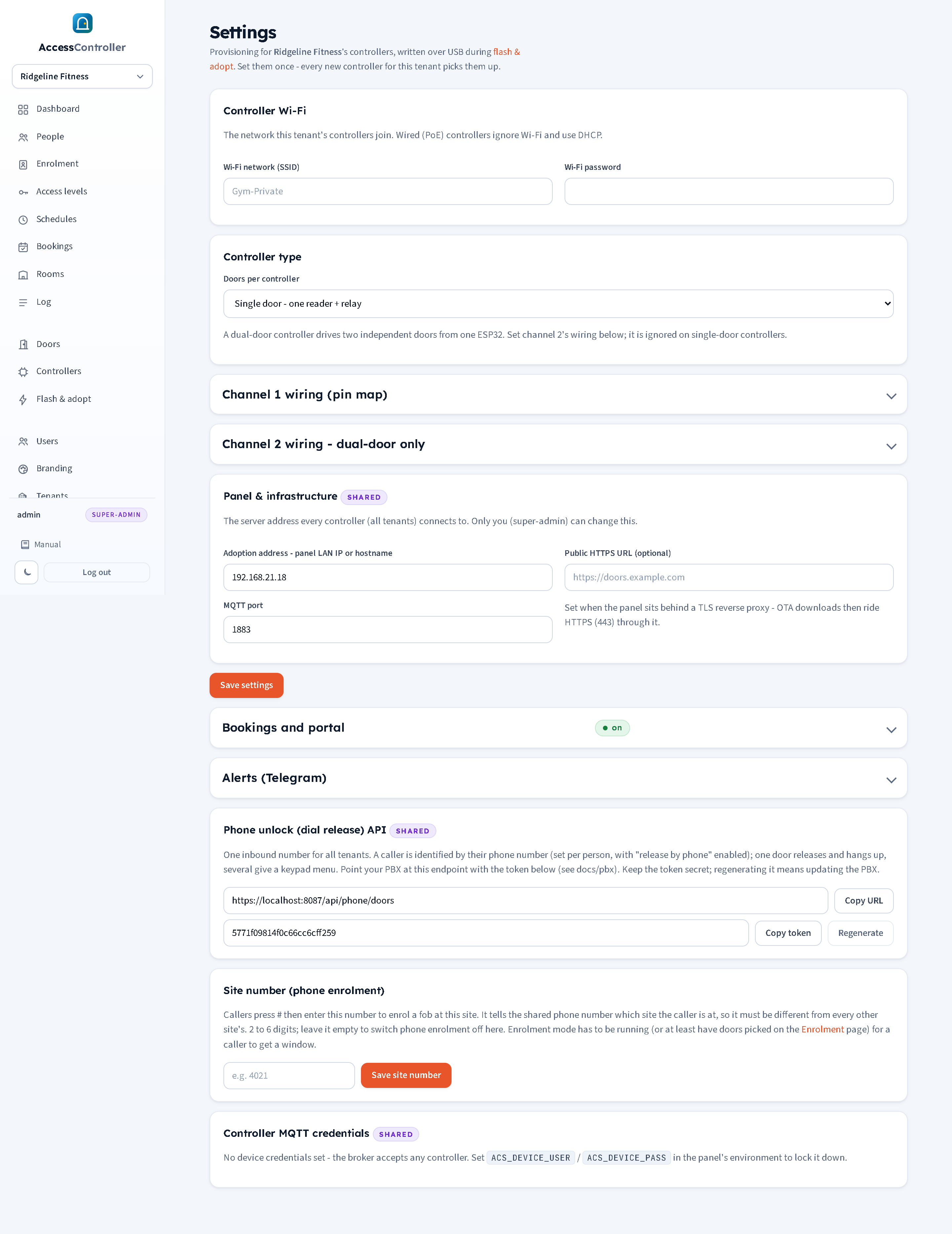
Viewers cannot see Settings. Admins and custom roles with the Settings tick see the tenant sections; the sections marked shared are visible and editable by super admins only.
Enrolment mode
There is no enrolment control on this page any more. Enrolment mode is started on the Enrolment page, where you tick the doors it should run at, choose the default access level and pick 15, 30, 60 or 120 minutes (chapter 6).
While it is running, a green Enrolment mode panel appears at the top of Settings showing where it is running, when it ends and which level new fobs get, with a Stop enrolment now button. That is all Settings does with it. When enrolment is off, the panel is not shown at all.
Controller Wi-Fi
| Field | Meaning |
|---|---|
| Wi-Fi network (SSID) | The wireless network the tenant's controllers join. Use a private, staff-only network with a strong password rather than guest Wi-Fi. 2.4 GHz only (the ESP32 has no 5 GHz radio). |
| Wi-Fi password | Its password. Stored on the panel and written to the controller at provisioning. |
Wired (PoE) controllers ignore these two fields and use DHCP on the cable.
Controller type
| Field | Meaning |
|---|---|
| Doors per controller | Single door - one reader + relay or Dual door - two readers + relays. The default for controllers provisioned from this tenant. The Flash & adopt wizard has a "Doors on this controller" selector that overrides this per unit. A dual-door unit drives two independent doors from one board using the channel 1 and channel 2 pin maps. |
Channel 1 wiring (pin map)
The GPIO numbers the controller uses for its first (or only) door. Defaults suit a generic classic ESP32 devkit and the Olimex ESP32-POE-ISO. Chapter 5 has the per-board tables, including the different safe pins for an ESP32-S3.
| Field | Default | Meaning |
|---|---|---|
| Wiegand D0 (green) | 32 | Reader data-0 line. |
| Wiegand D1 (white) | 33 | Reader data-1 line. |
| Relay | 4 | Output pin that drives the lock relay. |
| Relay active level | Active high | Active high: the pin goes HIGH to energise the relay. Active low: the pin goes LOW to energise. Match the relay module: many opto-isolated modules are active low. Getting this wrong leaves the relay energised at rest (a strike permanently released or a maglock permanently dropped). |
| Exit (REX) button | 14 | Input for the exit button, to 0 V. -1 if there is no button. |
| Door position sensor | 15 | Input for the door contact, to 0 V, closed when the door is closed. -1 if there is no sensor; this also disables forced and held-open alerts and door opened/closed logging for the door. |
| Relay pulse (ms) | 4000 | How long the relay stays energised after a grant, exit press or remote unlock. 3000 to 6000 ms is usual. |
The held-open alert time is not on this page: it is set per door as Alert if held open for N seconds on the door's own page (chapter 3) and pushed to the controller with its keyset.
Channel 2 wiring - dual-door only
The same seven fields for the second reader and relay of a dual-door controller. Ignored on single-door controllers. The pins must not clash with channel 1. Panel defaults: D0 25, D1 26, relay 27, REX 13, door 2, active high, 4000 ms. On an Olimex POE board GPIO 25, 26 and 27 belong to the Ethernet PHY; choose others.
Panel & infrastructure (shared, super admin only)
| Field | Meaning |
|---|---|
| Adoption address - panel LAN IP or hostname | The address every controller (all tenants) connects to for MQTT, written into controllers at provisioning. For a hosted panel this is its public hostname (for example doors.example.com); for a panel on the site LAN it is the panel machine's IP. The panel pre-fills its own LAN IP on a fresh install. It is also used to build the download address for over-the-air updates when no public HTTPS URL is set. |
| MQTT port | The port controllers connect to, 1883 by default. |
| Public HTTPS URL (optional) | Set when the panel sits behind a TLS reverse proxy such as Caddy (chapter 16), for example https://doors.example.com. Over-the-air firmware downloads then ride HTTPS on port 443 through the proxy instead of the panel's plain HTTP port. |
Press Save settings to save everything above. The sections below each have their own save button and are not covered by it.
Bookings and portal
A collapsible section, per tenant, that publishes the resident booking portal and holds its payment and messaging settings. It shows a green on badge while the portal is published. Chapter 8 covers rooms, bookings and the portal in full.
| Field | Meaning |
|---|---|
| Publish the resident portal | Master switch. While unticked the portal address returns "not found" and nobody can book. |
| Portal address | The short name in the portal's web address, for example riverside in https://doors.example.com/p/riverside/. Blank uses the tenant's own short name. Lowercase letters, digits, dash and underscore, up to 40 characters, and unique across every tenant on the panel. |
| Bank details shown on the payment page | Free text (account name, sort code, account number) shown to residents paying a priced booking by transfer. Blank means no bank option is offered. |
| Publishable key (Stripe) | Stored for completeness; card payments work from the secret key alone. |
| Secret key (Stripe) | The sk_... key. With it set, Pay by card appears on the resident's payment page. Shown as a set badge; the input is always blank, and blank keeps the stored key. Tick Remove the stored secret key and save to erase it. |
| Webhook signing secret (Stripe) | The whsec_... value from the Stripe webhook. Handled the same way as the secret key. Point a Stripe webhook for checkout.session.completed at the portal address with stripe/webhook on the end. |
| Hold a bank transfer booking for (minutes) | How long an unpaid bank-transfer booking keeps its slot before expiring. Default 120. |
| Hold a card booking for (minutes) | The same for a card booking. Default 30. |
| Gateway URL, Sender name or number, API key (SMS) | The gateway that delivers portal login codes. The panel sends it a JSON POST of to, from and text with an Authorization: Bearer header. With no URL set, login codes are only written to the server log and shown on the Bookings page, which is for commissioning only and must never be how real residents receive codes. |
| Save bookings settings | Saves this section. |
Site number (phone enrolment)
| Field | Meaning |
|---|---|
| Site number | 2 to 6 digits. A caller who presses # on the access line keys this in to say which building they are at, so it must differ from every other site's on the panel; the panel refuses a number already in use and says which. Leave it empty to switch phone enrolment off for this site. |
| Save site number | Saves it. |
The site number on its own does nothing: phone enrolment also needs enrolment doors ticked on the Enrolment page. Chapter 9 has the caller's side and chapter 6 the enrolment doors.
Alerts (Telegram)
A collapsible section, per tenant, that sends a Telegram message when a door is forced or held open. It shows a green on badge in its heading while alerts are enabled. Chapter 4 has the step-by-step set-up, how to get a chat ID and the troubleshooting table.
| Field | Meaning |
|---|---|
| Enable Telegram alerts | Master switch. Nothing is sent while unticked. |
| Bot token | The token from @BotFather. Shown as a set / not set badge; the input is always blank. Blank keeps the stored token, a value replaces it. |
| Forget the stored token | Shown once a token is stored. Tick and save to erase it. |
| Chat ID | The chat, group or channel to post into. Positive for a private chat, negative for groups and channels (often starting -100). |
| Door forced | Send on door forced. Default on. |
| Door held open | Send on door held open. Default on. |
| Save alert settings | Saves the section (it has its own button; Save settings above does not save it). |
| Find my chat ID | Saves, then lists every chat the bot has seen with a Use this button per row. |
| Send test message | Saves, then sends "Test from Access Controller (tenant name)" to the chat and reports success or the reason for failure. |
Repeat alerts of the same type for the same door are rate-limited to one Telegram message per minute. These settings take effect immediately and are not written to controllers.
Phone unlock (dial release) API (shared, super admin only)
| Field | Meaning |
|---|---|
| Endpoint URL | The address the PBX posts to, ending /api/phone/doors. Copy URL copies it. It is derived from the public URL when set. |
| Token | The shared bearer token that authenticates the PBX. Copy token copies it. |
| Regenerate | Issues a new token; the old one stops working at once and the PBX script must be updated. |
Chapter 9 covers the PBX side and the security notes.
Controller MQTT credentials (shared, super admin only)
This section is informational. It shows whether the panel's broker requires a username and password from controllers:
- If
ACS_DEVICE_USERandACS_DEVICE_PASSare set in the panel's environment (chapter 16), the username is shown here and the credentials are written into every controller at provisioning and carried over by re-point unless you type different ones. - If they are not set, the broker accepts any controller. That is acceptable on an isolated LAN and not acceptable on the internet: set the variables to lock the broker down.
The credentials cannot be changed from the panel; they belong to the server's configuration.
Where each setting takes effect
| Setting | Written to controllers... |
|---|---|
| Wi-Fi, adoption address, port, MQTT credentials, pin maps, channels | At Flash & adopt (USB or Bluetooth), via the setup portal, or by Re-point on the Controllers page. Never pushed silently to a running controller. |
| Enrolment mode (started on the Enrolment page) | Immediately, inside the next keyset push to the doors it runs at. |
| Bookings and portal | Not written to controllers. A confirmed booking is written into the room door's keyset as a time window and pushed straight away. |
| Site number | Not written to controllers. Used by the panel when the PBX calls the enrolment endpoint. |
| Held-open alert time (per door, on the door's page) | Immediately, inside the next keyset push to that door's controller. Needs the current firmware. |
| Alerts (Telegram) | Not written to controllers. Used by the panel the moment an alert arrives from a door. |
| Public HTTPS URL | Used by the panel when you press Update on a controller. |
| Phone API token | Used by the panel when the PBX calls; the PBX needs the new value. |